
Purpose and scope #
This tutorial shows how to add a NORVI X controller beside an existing Siemens S7-300 PLC so that it can read the same field signals the PLC uses, without touching the PLC program or changing how the PLC works. Typical reasons are remote monitoring, data logging, MQTT/Modbus gateways, a local dashboard, or a second pair of eyes on a machine that cannot be re-programmed.
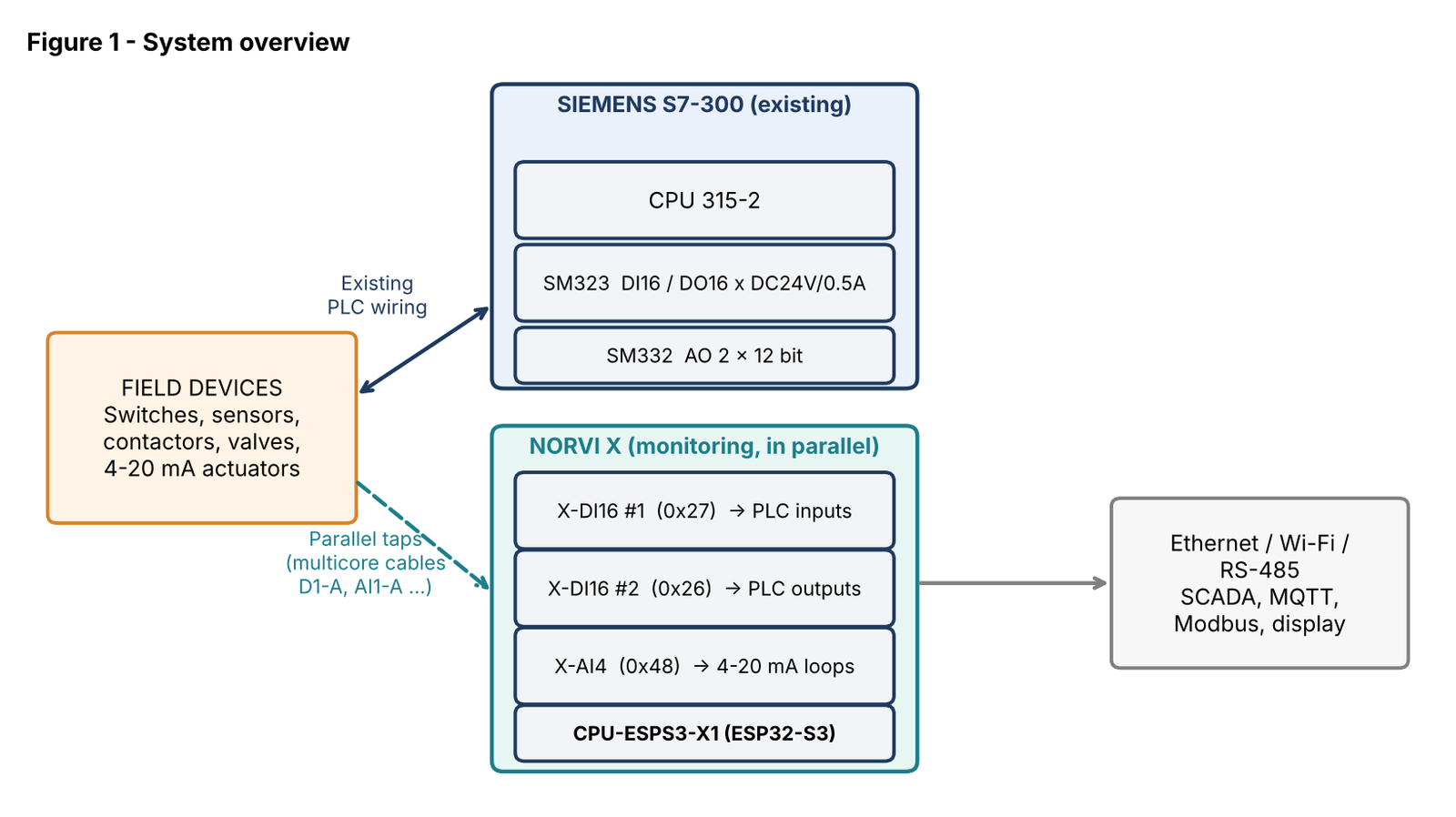
The system in this tutorial:
- PLC: Siemens CPU 315-2, SM323 DI16/DO16 x DC24V/0.5A (16 digital inputs, 16 digital outputs), SM332 AO 2 x 12 bit (2 analog outputs).
- Monitor: NORVI X CPU-ESPS3-X1, two NORVI X-DI16 (16 digital inputs each), one NORVI X-AI4 (4 analog inputs).
What “parallel wiring” means #
Parallel wiring means the NORVI X inputs are connected to the same electrical points as the PLC, so both devices see the same signal at the same time. The PLC remains the master of the process; NORVI X only listens.
| Signal type | How NORVI X connects | Effect on the PLC |
|---|---|---|
| Digital input (switch, sensor) | True parallel: X-DI16 input tapped onto the same wire as the PLC input terminal | Extra load of about 7 mA per tapped input |
| Digital output (coil, lamp, valve) | True parallel: X-DI16 input tapped across the same output and 0 V as the load | Negligible; PLC output still drives its load |
| Analog 4–20 mA | In-line (series): the current must pass through the X-AI4 to be measured | Adds the X-AI4 input burden to the loop |
| Important Analog current cannot be measured in parallel. A 4–20 mA signal is one current flowing around a loop, so the X-AI4 has to sit inside that loop. The rest of this document therefore treats analog as “in-line monitoring” and shows how to do it safely. |
Hardware and key specifications #
| Device | Key points (from NORVI datasheets unless noted) |
|---|---|
| NORVI X CPU-ESPS3-X1 | ESP32-S3-WROOM-1U-N16R2, 16 MB flash. 24 V DC supply (9–28 V DC allowed, about 40 mA). Ethernet, Wi-Fi/Bluetooth, RS-485, 2.0″ touch TFT, microSD, RTC. Expansion modules connect through the side expansion port; I²C on SDA = IO8, SCL = IO9. |
| NORVI X-DI16 (x2) | 16 optically isolated 24 V DC inputs, bi-directional optocouplers (sink or source), one common GND. Input range 0–30 V, OFF below 5 V, ON above 15 V, about 3.3 kΩ / 7 mA at 24 V. PCA9555 I²C expander, DIP-selectable address. 90 mA at 24 V. |
| NORVI X-AI4 | 4 analog inputs, 4–20 mA / 0–20 mA, ADS1115 16-bit I²C ADC, terminals AIN1–AIN4 and GND. DIP-selectable address. 80 mA at 24 V. |
| Siemens SM323 DI16/DO16 | 16 inputs and 16 outputs, 24 V DC; outputs rated 0.5 A. (The brief said “0.5V”; this is read as 0.5 A.) |
| Siemens SM332 AO 2 x 12 bit | 2 analog outputs, voltage or current mode set per channel in HW Config. In current mode it can drive 4–20 mA into a limited load resistance (confirm the figure in the Siemens manual, typically 500 Ω maximum). |
Cable schedule and naming convention #
Every signal group between the PLC cabinet and the NORVI X rack travels in its own numbered multicore cable, and every core is numbered. This makes the installation easy to check and to maintain. The cable schedule for this project is:
| Cable | Cores | Carries | Lands on |
|---|---|---|---|
| D1-A | 16 | SM323 digital inputs DI 0–15, one core per input | X-DI16 #1, IN1–IN16 |
| D2-A | 16 | SM323 digital outputs DO 0–15, one core per output | X-DI16 #2, IN1–IN16 |
| AI1-A | 4 | SM332 current loops (2 cores per loop) | X-AI4, AIN1–AIN2 and GND |
Colours can repeat in a 16-core cable, so the core number on a ferrule or tag is what identifies the signal, not the colour. Core n of D1-A always lands on IN n of the X-DI16. Keep that rule: it makes the cable self-documenting.
| Naming convention to adopt Cable “D1-A-7 O” means cable D1-A, core 7, orange. |
Rules before you wire anything #
- Power down and lock out the PLC cabinet and the field supply. Work on 24 V DC only; do not tap any mains-voltage signal with this method.
- Do not edit the PLC program or hardware configuration. Parallel wiring should need none; if a change seems necessary, stop and re-check the wiring.
- One 0 V reference. Join the X-DI16 GND terminals to the 0 V (M) of the same 24 V supply that feeds the PLC I/O. Do this at one point only, to avoid ground loops. The NORVI X may use the same 24 V supply or its own, but the two 0 V lines must be tied together for the digital inputs to read correctly.
- Check the load added to each signal. Each tapped input draws about 7 mA at 24 V. A sensor that already drives a PLC input (typically around 7 mA) will now drive roughly double. Confirm the sensor’s output rating before tapping it.
- Use numbered cables and ferrules. Label both ends. Landing a wire on the wrong input is the most common commissioning error.
- Keep signal cables short and away from motor or VFD power cables. Use shielded cable for analog, with the shield grounded at one end.
- Fuse the tap. A small fuse or fused terminal on the 24 V feed of any new branch protects the PLC wiring if a NORVI input is miswired.
Digital wiring: monitoring the SM323 #
Allocation of the two X-DI16 modules #
| Module | I²C | Monitors | Cable |
|---|---|---|---|
| X-DI16 #1 | 0x27 | SM323 inputs, DI 0–15 (the 16 field inputs) | D1-A (16-core) |
| X-DI16 #2 | 0x26 | SM323 outputs, DO 0–15 (the 16 driven loads) | D2-A (16-core) |
Inside each module, input n maps to the same index on the PLC module. IN1 → channel 0 up to IN16 → channel 15. The actual PLC addresses (for example I 0.0–1.7 and Q 4.0–5.7) depend on the slot position in HW Config; note them in the mapping table of your own project and keep it with the cable schedule.
Step by step: one PLC input #
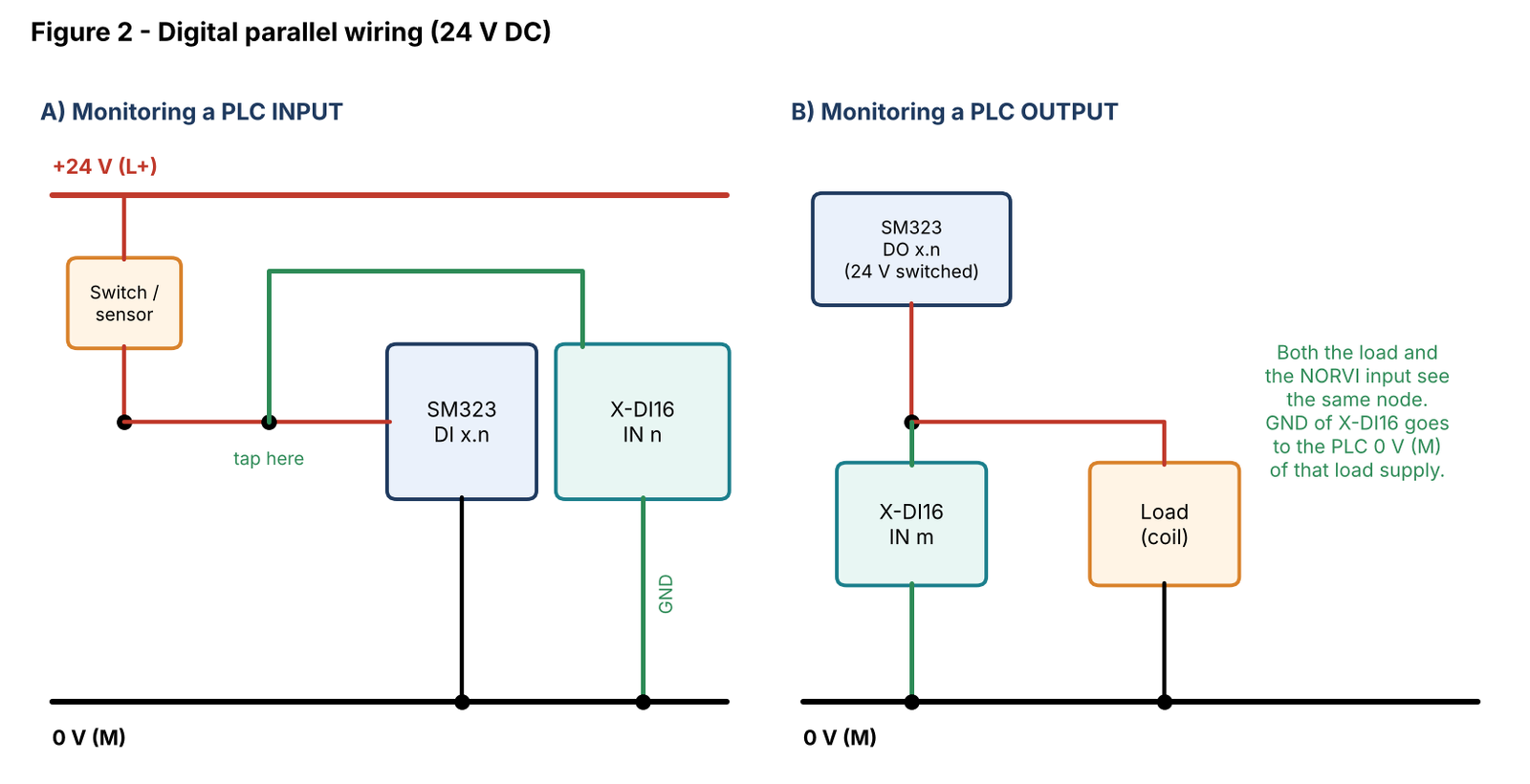
- Identify the field wire that reaches the PLC input terminal (the wire coming from the switch or sensor, at +24 V when ON).
- From the same terminal on the SM323 front connector, add a second wire in the same terminal or a feed-through terminal block. Run it into cable D1-A, core n.
- At the NORVI X end, land D1-A core n on the X-DI16 #1 terminal INn.
- Connect the X-DI16 GND terminal to the 0 V (M) of the PLC input supply, once per module.
- Repeat for the other inputs, then check each core number against the table before closing the panel.
Step by step: one PLC output #
- The SM323 outputs switch +24 V to the load. Identify the wire between the PLC output terminal and the load (coil, relay, lamp).
- Tap that wire with a second wire into cable D2-A, core m, and land it on X-DI16 #2 terminal INm.
- Connect the X-DI16 #2 GND to the same 0 V (M) as the load supply. Do not tie it to any other reference.
When the PLC turns the output ON, the load and the X-DI16 input both see 24 V, so the LED for that input lights. The input has high impedance compared with a 0.5 A load, so it does not affect the output.
| Why X-DI16 suits this job The bi-directional optocouplers accept both sinking and sourcing signals on a single common, and the inputs are isolated (above 1500 Vrms) from the NORVI CPU. A mixed PNP/NPN field can therefore be monitored without extra interface relays. |
Analog wiring: monitoring the SM332 outputs #
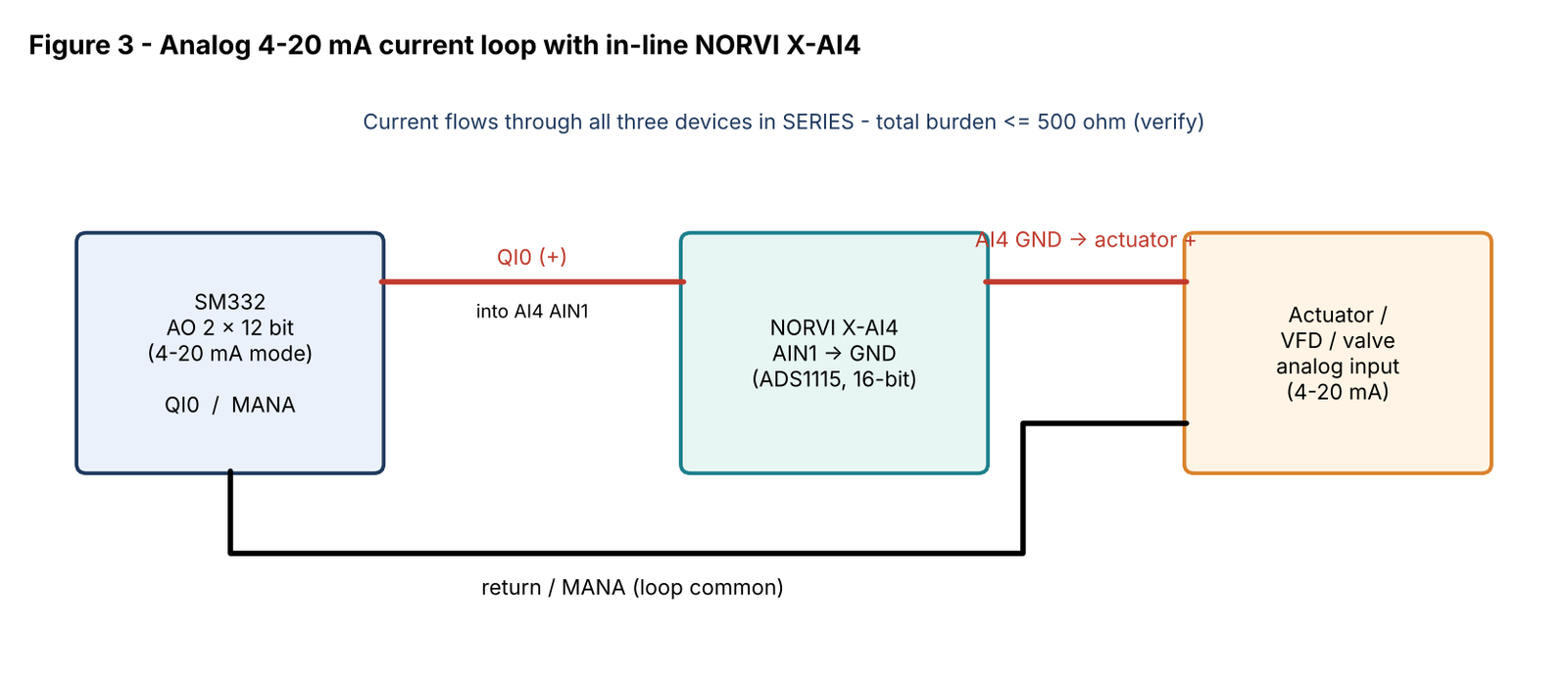
The SM332 has two outputs. When both are set to 4–20 mA, each drives its actuator (a drive speed reference, valve positioner, etc.). To watch the value the PLC is sending, insert one X-AI4 channel in series with that loop.
| SM332 channel | X-AI4 terminal (in) | Return / GND | Cable AI1-A cores |
|---|---|---|---|
| Channel 0 (QI0) | AIN1 | GND, then to actuator + | 1 in, 2 out |
| Channel 1 (QI1) | AIN2 | GND, then to actuator + | 3 in, 4 out |
| Spare | AIN3, AIN4 | GND | Second AI cable if needed |
Step by step #
- Switch the SM332 channel to current mode in HW Config and set the module jumper or coding element as the Siemens manual specifies. The X-AI4 is a 4–20 mA / 0–20 mA module, so it cannot measure a channel left in voltage mode.
- Open the loop at the SM332 current output terminal (QI) and route the + wire to AIN1 (cable AI1-A core 1).
- From the X-AI4 GND, continue to the actuator + input (core 2). The actuator − input stays connected to the SM332 MANA, as before.
- Calculate the loop burden: actuator input resistance + X-AI4 input resistance + cable. The total must stay below the SM332 maximum load for current mode (about 500 Ω; confirm). The X-AI4 shunt value is in its user guide.
- With the loop commissioned, remove 24 V from the X-AI4 and check the actuator still gets its 4–20 mA. If the loop opens when the module is off, add a bypass terminal or choose a different method (for example the PLC network values).
| If the PLC uses 0–10 V outputs A voltage output can be tapped in parallel, but the X-AI4 does not read volts. NORVI lists a separate 4 x 0–10 V analog input module for that case; use it in place of the X-AI4 and wire AIN to the output and GND to MANA. |
Connecting the modules and setting addresses #
Slide the X-DI16 and X-AI4 modules onto the DIN rail beside the CPU and press them together so the expansion bus connects; all modules share I²C (SDA = IO8, SCL = IO9) and the 24 V supply. Each module on the bus must have a unique address, set with its DIP switches.
| Module | DIP 1 / 2 / 3 / 4 | Address | Role |
|---|---|---|---|
| X-DI16 #1 | OFF / OFF / OFF / x | 0x27 | Monitors PLC inputs |
| X-DI16 #2 | ON / OFF / OFF / x | 0x26 | Monitors PLC outputs |
| X-AI4 | OFF / OFF / OFF / ON | 0x48 | Monitors 4–20 mA loops |
Note that the CPU’s own expansion helper (a PCA9539 at 0x75) and its RTC also live on the same bus; none of the addresses above clash with them. Power-cycle after changing any DIP switch.
Reading the data #
This Arduino sketch (ESP32 core, Adafruit_ADS1X15 library) reads both digital modules and the first analog channel and prints them on the serial monitor. Use it as a bench test before adding MQTT, Modbus or a display.
#include <Wire.h>
#include <Adafruit_ADS1X15.h>

const uint8_t DI16_IN  = 0x27;   // X-DI16 #1  (monitors PLC inputs)
const uint8_t DI16_OUT = 0x26;   // X-DI16 #2  (monitors PLC outputs)
const bool    INVERT   = false;  // set true if bench test shows inverted logic
const float   SHUNT_OHMS = 0;    // TODO: take from the X-AI4 user guide

Adafruit_ADS1115 ads;

uint16_t readDI16(uint8_t addr) {
  Wire.beginTransmission(addr);
  Wire.write(0x00);                 // PCA9555 input port 0, then port 1
  Wire.endTransmission(false);
  Wire.requestFrom(addr, (uint8_t)2);
  uint16_t v = Wire.read();
  v |= (uint16_t)Wire.read() << 8;
  return INVERT ? (uint16_t)~v : v;
}

void setup() {
  Serial.begin(115200);
  Wire.begin(8, 9);                 // SDA = IO8, SCL = IO9
  ads.begin(0x48);
  ads.setGain(GAIN_ONE);            // +/-4.096 V range
}

void loop() {
  Serial.printf("PLC DI  : 0x%04X\n", readDI16(DI16_IN));
  Serial.printf("PLC DO  : 0x%04X\n", readDI16(DI16_OUT));
  int16_t raw = ads.readADC_SingleEnded(0);      // AIN1
  float volts = ads.computeVolts(raw);
  Serial.printf("AIN1 raw=%d  %.3f V", raw, volts);
  if (SHUNT_OHMS > 0) Serial.printf("  %.2f mA", volts / SHUNT_OHMS * 1000.0);
  Serial.println();
  delay(500);
}- Bit order: confirm which bit of the 16-bit value belongs to which terminal by putting a jumper from +24 V to IN1, IN2 and so on, then mark the result in your mapping table.
- Analog scaling: once the shunt value is confirmed, calibrate with a known 4 mA and 20 mA source and store both raw readings; this removes shunt and ADC tolerance.
Commissioning checklist and troubleshooting #
| # | Check before power-up |
|---|---|
| 1 | All cables labelled at both ends; core n matches terminal n on the X-DI16 (checked with a continuity meter). |
| 2 | X-DI16 GND tied to the PLC 0 V (M) at one point only; no other ground connection from the NORVI DI side. |
| 3 | DIP addresses set and unique (0x27, 0x26, 0x48); modules fully clicked together on the DIN rail. |
| 4 | SM332 channels set to current mode, loop burden below the SM332 limit, loop still closed with the X-AI4 unpowered. |
| 5 | 24 V supplies and fuses correct; polarity checked on every NORVI module. |
| 6 | PLC in its normal run mode; one input exercised at a time and compared against the PLC input status in the programming software. |
| Symptom | Likely cause | Fix |
|---|---|---|
| An X-DI16 input never turns on | GND not tied to PLC 0 V, or signal below the 15 V threshold | Join the references; measure the voltage at the terminal |
| A PLC input became unstable after tapping | Sensor cannot supply the extra current | Use a relay/buffer or power the tap from a separate output |
| I²C device not found | Duplicate or wrong DIP address, modules not seated | Re-check the table in section 8, power-cycle |
| Analog reading always zero | SM332 channel in voltage mode, or loop broken | Set the channel to current mode, check the in-line wiring |
| Actuator speed drops once the X-AI4 is added | Loop burden too high | Shorten wires; confirm the X-AI4 shunt value and the SM332 limit |
Assumptions and datasheets #
- Cable names and core assignments in section 4 are a suggested schedule; adapt them to your own panel documentation.
- Siemens values (input current, load limit, front-connector terminal numbers) are typical figures and must be confirmed in the SM323 and SM332 manuals for your exact order numbers.
- The NORVI X-DI16 datasheet mentions both four and eight selectable addresses; the DIP table lists eight. Only two modules are used here, so this does not affect the design.
Datasheets
- NORVI X CPU-ESPS3-X1: https://norvi.io/docs/norvi-x-cpu-esps3-x1-datasheet/
- NORVI X-DI16: https://norvi.io/docs/norvi-x-di16-datasheet/
- NORVI X-AI4: https://norvi.io/docs/norvi-x-ai4-datasheet/


