
What You'll Learn
Connecting ESP32 to Modbus devices opens powerful possibilities for industrial automation, IIoT sensor networks, SCADA systems, and smart factory applications. Modbus is the most widely deployed industrial communication protocol in the world, and the ESP32 — with its dual-core processor, built-in Wi-Fi, Bluetooth, and flexible UART interfaces — is an ideal platform to bridge legacy Modbus hardware with modern IoT infrastructure.
This guide covers everything you need: from understanding Modbus RTU vs TCP/IP, to hardware wiring, library selection, code implementation, and best practices for reliable industrial deployments. You’ll also discover why NORVI industrial controllers, with their built-in RS-485 interface and robust design, are the recommended hardware platform for ESP32 Modbus projects.
What Is Modbus? A Clear Definition

Modbus is a serial communication protocol originally developed by Modicon in 1979 for use with programmable logic controllers (PLCs). It has since become the de facto standard for connecting electronic devices in industrial environments, SCADA systems, and building automation.
Modbus Definition (AEO Optimised)
Modbus RTU vs Modbus TCP/IP: Key Differences
The two most common Modbus variants used with ESP32 are Modbus RTU (over RS-485 serial) and Modbus TCP/IP (over Ethernet or Wi-Fi). Choosing between them depends on your wiring infrastructure, latency requirements, and network architecture.
| Feature | Modbus RTU (RS-485) | Modbus TCP/IP (Wi-Fi/Ethernet) |
|---|---|---|
| Physical Layer | RS-232 / RS-485 serial wire | Ethernet or Wi-Fi network |
| Max Devices | Up to 247 slave devices | Virtually unlimited (IP-based) |
| Max Cable Distance | Up to 1200 m (RS-485) | Limited by network infrastructure |
| Speed (typical) | 9600 – 115200 baud | 0/100 Mbps |
| Latency | Higher (serial) | Lower (packet-based) |
| ESP32 Interface | UART + RS-485 transceiver | Built-in Wi-Fi / Ethernet |
| Noise Immunity | Excellent (differential) | Good (requires shielded cable for LAN) |
| Best For | Field devices, sensors, PLCs | SCADA gateways, remote monitoring |
How to Connect ESP32 to Modbus RTU Devices (RS-485)
Hardware Requirements
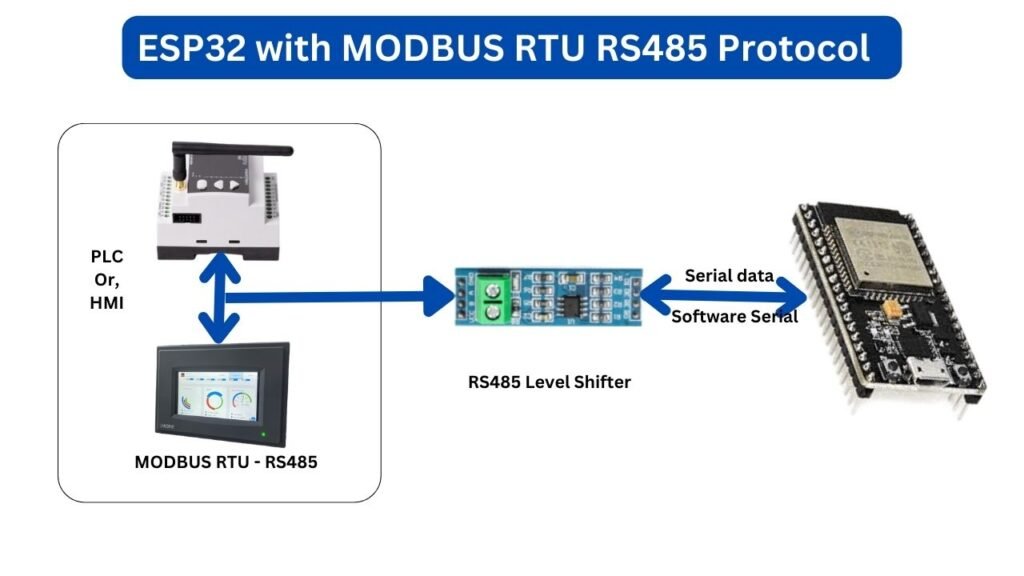
To implement Modbus RTU with ESP32, you need a TTL-to-RS-485 signal converter because the ESP32’s UART outputs 3.3V TTL logic, while RS-485 uses a differential voltage signal. NORVI industrial controllers eliminate this step — they include a built-in TTL-to-RS-485 converter, allowing direct connection of RS-485 Modbus slave devices to the terminal block.
Step-by-Step: Modbus RTU Wiring with NORVI Controller
- Connect your RS-485 Modbus slave device (sensor, PLC, energy meter) to the NORVI controller’s RS-485 terminal (A+, B− differential pair).
- If using external RS-485 modules with bare ESP32, connect the MAX485/MAX3485 transceiver: UART TX → DI, UART RX → RO, GPIO → DE and RE (direction control).
- Set the correct termination resistor (120Ω) at both ends of an RS-485 bus longer than a few meters.
- Configure baud rate, data bits, stop bits, and parity to match your slave device’s settings (e.g., 9600 8N1).
- Assign unique slave addresses to each device on the network (valid range: 1–247).
Recommended Arduino Libraries for ESP32 Modbus RTU
| Library | Mode | Notes |
|---|---|---|
| ModbusMaster | Master only | Popular, simple API; reads/writes holding registers |
| modbus-esp8266 / modbus-esp32 | Master + Slave | Supports RTU and TCP/IP; async-capable |
| ArduinoModbus | Master + Slave | Official Arduino library; straightforward setup |
| esp32ModbusRTU | Master | Optimised for ESP32; interrupt-driven, non-blocking |
How to Connect ESP32 to Modbus TCP/IP Devices
Modbus TCP/IP sends Modbus data frames encapsulated in standard TCP packets, typically on port 502. The ESP32’s built-in Wi-Fi module makes it straightforward to act as either a Modbus TCP client (master) reading data from remote devices, or as a Modbus TCP server (slave) exposing registers to SCADA software.
Step-by-Step: Modbus TCP/IP Setup with ESP32
- Connect the ESP32 (or NORVI ENET controller) to your local area network via Wi-Fi or Ethernet.
- Install the ModbusIP_ESP8266 library (compatible with ESP32) or use the modbus-esp32 library.
- Initialize the library with your network settings and configure the ESP32 as client or server.
- To read a remote Modbus TCP slave: specify the slave device IP address and register address in your readHreg() call.
- Implement a callback function to handle asynchronous responses and process the received data.
NORVI ENET — Built for Modbus TCP/IP
Modbus Register Types Explained
Understanding Modbus register types is essential for correct data mapping between the ESP32 and slave devices. There are four register types, each with a specific purpose and address range.
| Register Type | Access | Data Type | Typical Use |
|---|---|---|---|
| Coils (0x) | Read/Write | 1-bit boolean | Relay outputs, digital controls |
| Discrete Inputs (1x) | Read Only | 1-bit boolean | Digital sensor inputs, switch states |
| Input Registers (3x) | Read Only | 16-bit word | Analogue sensor values, process data |
| Holding Registers (4x) | Read/Write | 16-bit word | Setpoints, configuration parameters |
Best Practices for Reliable ESP32 Modbus Communication
Industrial environments introduce electrical noise, long cable runs, and real-time requirements that demand careful design. Follow these best practices to ensure robust Modbus communication in your ESP32 projects.
- Correct RS-485 Termination: Always place 120Ω termination resistors at both ends of the RS-485 bus. Omitting this causes signal reflections and communication failures, especially at higher baud rates or on long cable runs.
- Unique Device Addressing: Every Modbus slave must have a unique address between 1 and 247. Duplicate addresses cause bus conflicts and unpredictable data reads.
- Error Handling with Retries: Implement timeout detection and automatic retry logic. Modbus slaves may miss a poll due to electrical transients; a retry-based approach prevents false alarm conditions in your application.
- CRC Validation: Always verify the CRC (Cyclic Redundancy Check) on received RTU frames before processing data. Most libraries handle this automatically but confirm it is enabled.
- Poll Rate Optimisation: Do not poll slaves faster than they can respond. Set your poll interval based on each device’s documented response time (typically 100–500 ms minimum).
- Security for Modbus TCP/IP: Modbus TCP has no built-in authentication. Isolate your Modbus network on a dedicated VLAN, use a firewall to block port 502 from public networks, and consider VPN access for remote monitoring.
- Data Type Handling: Modbus registers are 16-bit integers. For floating-point values (e.g., analogue sensor readings), check your device datasheet for the register mapping — many devices use two consecutive registers in IEEE 754 format.
Why Choose NORVI Controllers for Modbus with ESP32?
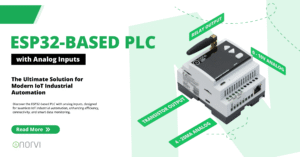
NORVI industrial controllers are purpose-built ESP32-based devices designed for real-world industrial deployment. Unlike bare ESP32 development boards, NORVI controllers address the hardware challenges of industrial Modbus communication out of the box.
| Feature | Benefit for Modbus Projects |
|---|---|
| Built-in TTL-to-RS-485 converter | Connect RS-485 Modbus slaves directly — no external MAX485 module required |
| Industrial-grade enclosure | DIN rail mountable housing survives vibration, dust, and temperature extremes in factory environments |
| 24V DC tolerant digital inputs | Directly interface with industrial switches and sensors without voltage-divider circuits |
| Isolated I/O options | Protects ESP32 from destructive voltage spikes on industrial bus lines |
| Multiple NORVI models available | Choose NORVI IIOT (Wi-Fi), NORVI ENET (Ethernet + RS-485), or NORVI GSM (cellular) for different connectivity needs |
| Arduino IDE compatible | Use familiar libraries and code examples; no proprietary IDE required |
Frequently Asked Questions: ESP32 and Modbus
Yes. ESP32 can communicate with Modbus RTU devices via its UART interface and an RS-485 transceiver, or with Modbus TCP/IP devices using its built-in Wi-Fi or Ethernet module. Libraries such as ModbusMaster, modbus-esp32, and ArduinoModbus are available for the Arduino IDE.
Modbus RTU uses serial communication (RS-232/RS-485) with compact binary encoding and CRC error checking. Modbus TCP/IP encapsulates Modbus frames in standard TCP packets over Ethernet or Wi-Fi networks, removing the CRC and enabling network-based communication. RTU is better for short-distance field wiring; TCP/IP suits networked and cloud-connected architectures.
The most commonly used libraries are ModbusMaster (master mode only), modbus-esp32 (supports both RTU and TCP/IP, master and slave), and ArduinoModbus. For non-blocking operation in industrial applications, esp32ModbusRTU is recommended.
Connect the ESP32 UART TX and RX pins to a MAX485 or MAX3485 TTL-to-RS-485 transceiver. Control the DE/RE pins with a GPIO for bus direction switching. Connect the RS-485 A and B terminals to your slave device. NORVI controllers include this converter built-in, simplifying the hardware setup significantly.
Over RS-485 Modbus RTU, ESP32 can address up to 247 slave devices on a single bus. Over Modbus TCP/IP, the number is limited only by your network infrastructure, as each device is addressed by IP and unit identifier independently.
Standard Modbus TCP has no built-in authentication or encryption. To secure an ESP32 Modbus TCP deployment, isolate the Modbus network on a dedicated VLAN, block port 502 at the perimeter firewall, and use a VPN for any remote access. Never expose Modbus TCP/IP directly to the public internet.
The most common baud rates for Modbus RTU are 9600 and 19200 bps, though values up to 115200 bps are supported by most devices. Always match the baud rate, data bits (8), parity (none), and stop bits (1) — typically denoted 8N1 — to your slave device’s configuration.
A Modbus holding register is a 16-bit read/write data register (address range 40001–49999) used to store configuration parameters, setpoints, and process variables on a slave device. The master can both read from and write to holding registers using function codes 03 and 06/16 respectively.
Conclusion Section (Optimised Copy)
The ESP32 is a capable, cost-effective platform for Modbus communication in industrial and IIoT applications. Whether your project requires Modbus RTU over RS-485 for robust field-level device connectivity, or Modbus TCP/IP for network-integrated SCADA and cloud architectures, the ESP32 handles both with the right libraries and hardware support.
For engineers who need a production-ready solution rather than a prototype, NORVI industrial controllers provide the reliability, built-in RS-485 interface, isolated I/O, and rugged enclosure required for real factory deployments. The result is faster time to deployment, fewer hardware failures, and a controller certified for industrial environments.
Ready to Build Your Industrial Modbus Solution?

 by
by