

Touch Functional Test #
The ESP32 HMI uses a 7” TFT with a capacitive touch display. After the display is set up, the touch feature may need to be calibrated for better accuracy. Calibrating the touch feature of a display can be done in just a few simple steps.
First, we need to handle touch. This code reads touch input from the TAMC_GT911 touchscreen controller reads touch inputs and outputs the X and Y coordinates to the serial monitor for debugging. The serial monitor displays only the X and Y coordinates of the touch point. It is commonly used in capacitive touchscreen displays.
Next, make an accurate attempt to touch each of the four corners; the serial monitor will display the Horizontal position of the touch on the screen and Vertical position of the touch on the screen. The display can be calibrated based on these values.
Here’s a breakdown of what each part of the code does,
Include Libraries: The code includes the necessary libraries for the TAMC_GT911 touchscreen (TAMC_GT911 ) and the I2C communication (I2C).
#include <Wire.h>
#include <TAMC_GT911.h>
Define Pins: It defines the pins used for I2C communication (GT911_SDA, GT911_SCL) and the interrupt (GT911_INT) pin for the touchscreen. Additionally, it defines the touch interrupt pin (GT911_INT), which is used for interrupt-based touch detection.
//  GT911_SDA 19, GT911_SCL 20

#define GT911_SDA 19
#define GT911_SCL 20
#define GT911_INT -1   // optional interrupt pin
#define GT911_RST 38   // optional reset pin
Touchscreen Object Initialization: initializes the touchscreen object (ts) With the defined reset pin and touch the interrupt pin. Optionally, it can also specify the I2C interface (I2C) if an alternate I2C port is used. The rotation of the touchscreen is set to 0 by default in the code.
TAMC_GT911 ts(GT911_SDA, GT911_SCL, GT911_INT, GT911_RST, 800, 480); // max raw X/Y
Setup Function #
- It initializes serial communication for debugging purposes
- It initializes the I2C communication
- It initializes the touchscreen
- It sets the rotation of the touchscreen
void setup() {
  Serial.begin(115200);
  Wire.begin(GT911_SDA, GT911_SCL);

  ts.begin();
  ts.setRotation(0); // adjust rotation if needed
  delay(100);
  Serial.println("GT911 Capacitive Touch Test (Proper Event Handling)");
}
Loop Function #
- It continuously calls ts.read() to update and monitor the current touch status.
- It detects a new touch event using if (ts.isTouched && !lastTouch) to ensure coordinates are printed only once when the touch begins.
- It reads the x and y coordinates of all detected touch points, checks if they are within the valid screen range (800×480) and prints them to the Serial Monitor.
- It resets the touch status when the screen is released and adds a small 50 ms delay for stable operation.
void loop() {
  ts.read(); // update touch points

  if (ts.isTouched && !lastTouch) { // only print when a new touch starts
    lastTouch = true;

    for (int i = 0; i < ts.touches; i++) {
      int x = ts.points[i].x;
      int y = ts.points[i].y;

      // Only print valid coordinates
      if (x < 800 && y < 480) {
        Serial.print("x = ");
        Serial.print(x);
        Serial.print(", y = ");
        Serial.println(y);
        Serial.println("------------------------------------------------------------------------");
      }
    }
  } else if (!ts.isTouched) {
    lastTouch = false; // reset when touch released
  }
  delay(50); // small delay for loop stability
}
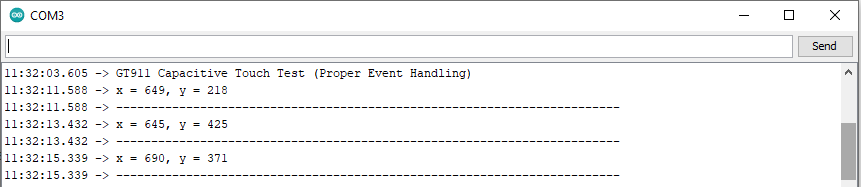
The corresponding coordinates are displayed on the serial monitor when you touch the display.
Touchscreen Calibration Process #
Access the relevant calibration code and modify the parameters TOUCH_MAP_X1, TOUCH_MAP_X2, TOUCH_MAP_Y1, and TOUCH_MAP_Y2 in the touch.h file. Start with the default values from the touch functional code and make incremental adjustments as needed.
Calibrate the touchscreen by touching specific points and adjusting the calibration values until the reported coordinates match the touches. Take rotation into account, save the final values in the code, and verify touch detection visually.
Calibrate the touchscreen using calibration libraries and parts related to touch calibration in the code.
#define TOUCH_GT911
#define TOUCH_GT911_SCL 20//20
#define TOUCH_GT911_SDA 19//19
#define TOUCH_GT911_INT -1//-1
#define TOUCH_GT911_RST -1//38
#define TOUCH_GT911_ROTATION ROTATION_NORMAL
#define TOUCH_MAP_X1 800//480
#define TOUCH_MAP_X2 0
#define TOUCH_MAP_Y1 480//272
#define TOUCH_MAP_Y2 0
It defines mapping parameters for the X and Y axes along with other configuration settings such as pins.
The touch calibration code includes initialization, event handling, and functions to check if the screen is touched or released. The specific implementation details vary based on the selected touch library.
It defines specific configurations for the GT911 touch controller, which is selected by uncommenting TOUCH_GT911. Various pin configurations and mapping values for touch input are specified.
/* uncomment for GT911 */
#define TOUCH_GT911
#define TOUCH_GT911_SCL 20  //20
#define TOUCH_GT911_SDA 19  //19
#define TOUCH_GT911_INT -1  //-1
#define TOUCH_GT911_RST -1  //38
#define TOUCH_GT911_ROTATION ROTATION_NORMAL
#define TOUCH_MAP_X1 800  //480
#define TOUCH_MAP_X2 0
#define TOUCH_MAP_Y1 480  //272
#define TOUCH_MAP_Y2 0


