

Overview #
The EC-M12-BC-C6-C is a battery-powered data logger designed for low-power remote monitoring applications.
It combines NB-IoT / LTE-M connectivity with Modbus RTU communication, enabling efficient data collection and transmission in industrial and IoT environments.
In this use case, the device reads data from the a DJLK ultrasonic level sensor via Modbus and publishes the data to a ThingsBoard dashboard using low power sleep mode
For a detailed guide on setting up ThingsBoard, please refer to: Connecting ESP32 to ThingsBoard over WiFi
Initial setup #
- Firstly, power source is configured as USB by setting on-board jumper to position 2.
- To setup the Arduino IDE to program the STM32L0 microcontroller please refer to : EC-M12-BC-C6-C-A-Initial_setup
- The exported binary file can be uploaded to STM32 microcontroller through a ST-Link Programmer.
- The connections GROUND, CLK, DIO, RESET should be connected with the ST-Link Programmer.
Hardware setup #
Connect XY-MD02 sensor to 8 pin connector’s RS-485 line and powered the sensor using 12V output as in the below picture.
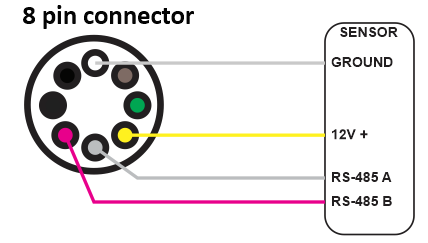
After that change the power source to battery power by setting the on-board jumper to position 1.
Software setup #
- Define pin configurations as the datasheet.
- Initialize the modem
- Start low-power operation
- Configure the modem to run in LTE only mode.
- Set up the MQQT broker setup
- Enable the RS485 and booster
- Read DJLK ultrasonic level sensor data via Modbus and send to thingsboard dashboard
- Configure SIM7070 modem into sleep mode.
- Send “AT+CSCLK=1” to enable sleep mode.
- Set DTR pin HIGH for 3 seconds to allow modem to sleep.
- Disable peripherals and booster, put device into low-power sleep for 3 minutes.
- After wake up, exit the modem sleep and continue the loop from where it stopped.
- Keep DTR pin LOW.
- Send “AT+CSCLK=0” to disable sleep.
Please refer below configured GitHub link for full program: EC-M12-BC-C6-C Sleep mode Application
Operating Workflow #
When the device is powered by the battery, the SIM7070 LTE modem establishes a connection via the 4G network. Once the network and MQTT connections to the ThingsBoard broker are successfully established, the system reads data from the DJLK ultrasonic level sensor through the RS485 interface. The collected data is then transmitted to the ThingsBoard dashboard.
After the data transmission is complete, the modem goes to sleep mode , all peripherals are disconnected, the booster power is disabled, and the MCU enters a low-power sleep mode to conserve energy.
| Stage | Description | Typical Duration |
|---|---|---|
| Initial cycle | Device powers up and initializes modem and send data | 57 seconds |
| Sleep | Low power sleep | 3 minutes |
| Data send | Wake up from sleep mode, read sensors and send data. | 22 seconds |
Power Consumption Analysis #
Power consumption of the system can divide into three main stages
- Initial cycle
- Data send cycle
- MCU sleep mode (Low power sleep mode)
Initial cycle #
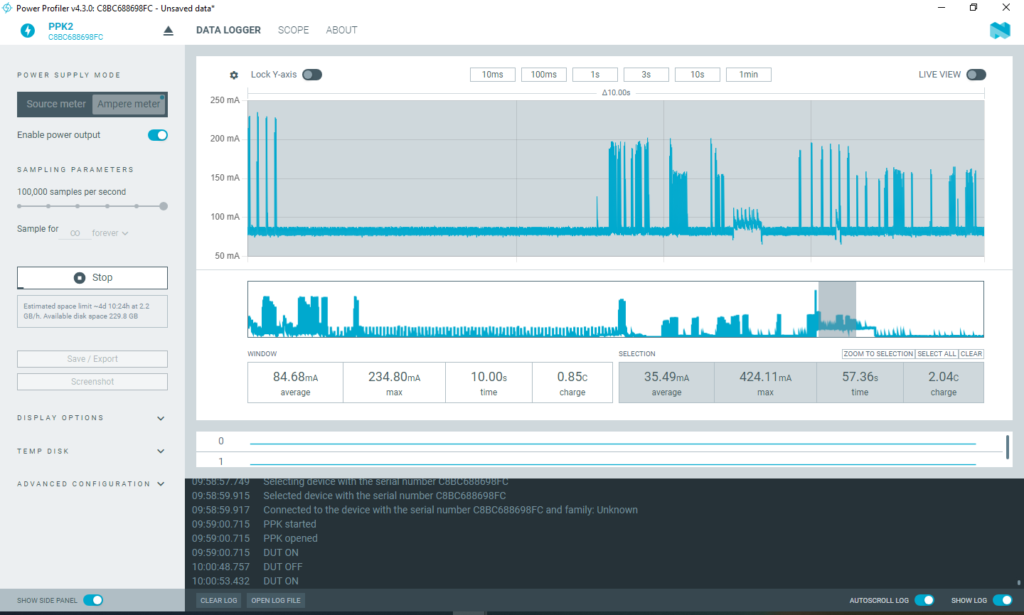
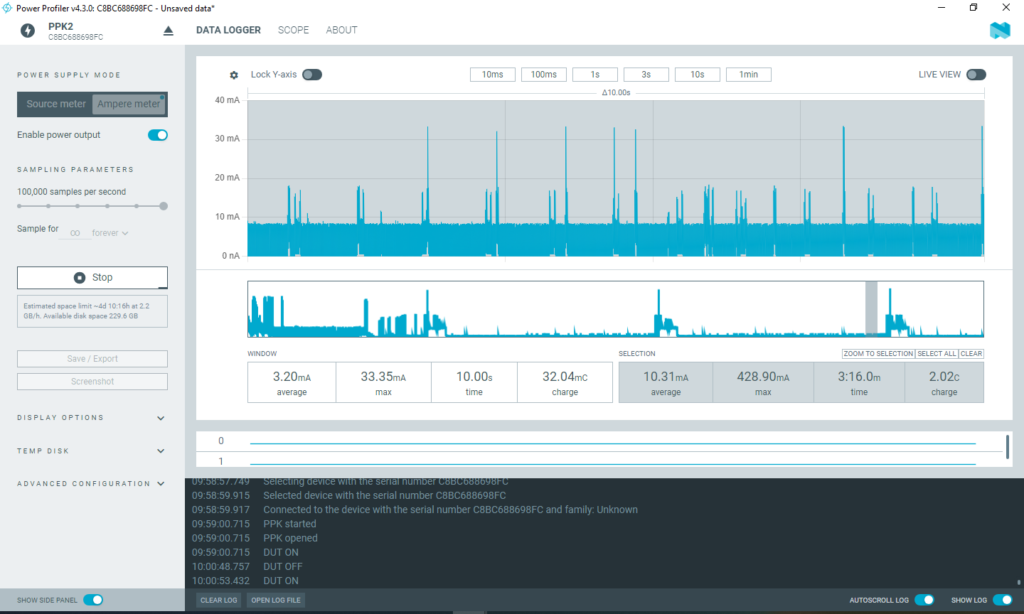
During the initial cycle, the system initializes the modem along with all other peripherals. On average, a current of approximately 35.49 mA is drawn for about one minute. During this period, the SIM7070 LTE modem connects to the 4G network, generating occasional high-current spikes of up to 0.42 A. With two lithium batteries connected in parallel, the system can reliably supply this current demand.
A tantalum capacitor (1000 µF) placed close to the modem acts as a local energy reservoir, supplying the instantaneous surge current while the batteries maintain the average load.
According to the ER34615H (D) lithium primary battery datasheet, each cell can deliver a maximum pulse current of 300 mA for 100 milliseconds every 2 minutes. Based on power profile observations, the modem’s initialization phase produces current pulses exceeding 300 mA, lasting 30–40 milliseconds each. These pulses are within the battery’s safe operating capability, allowing the modem to initialize and operate reliably without excessive voltage drop or battery stress.
Data send cycle #
During this process, the system wakes up from low-power sleep mode and continues the loop from where it previously stopped. First, it takes the modem out of sleep mode and reinitializes all peripherals. It then reads data from the DJLK ultrasonic sensor via the RS485 interface and transmits the level and battery readings to ThingsBoard over the 4G network.
At this stage, the system draws an average current of approximately 67.58mA for a duration of around 22 seconds.
MCU sleep mode (Low power sleep mode) #
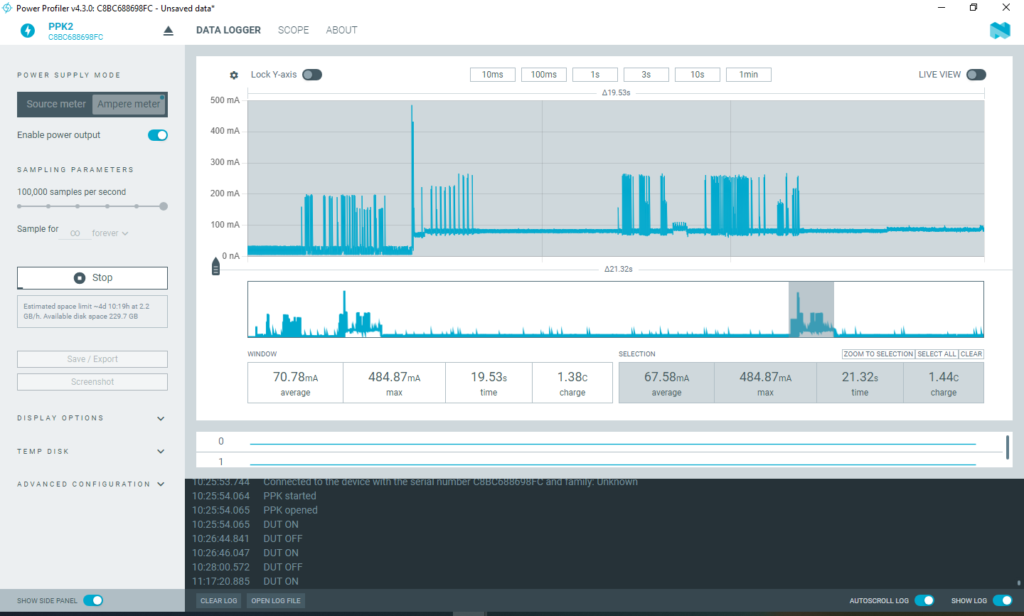
After data transmission is complete, the MCU enters sleep mode. During this period, the modem remains connected, system clocks stay active, and RAM is preserved without clearing. Some peripherals are disconnected to reduce current consumption and maintain low-power operation.
In this mode, the system draws a low current of approximately 3.30 mA for a duration of 3 minutes. Occasional short current spikes between 20 mA and 30 mA occur due to modem and clock maintenance activities. These spikes are negligible and do not affect battery performance, as the lithium battery can safely tolerate pulse currents up to 300 mA for 100 milliseconds, according to its specifications.
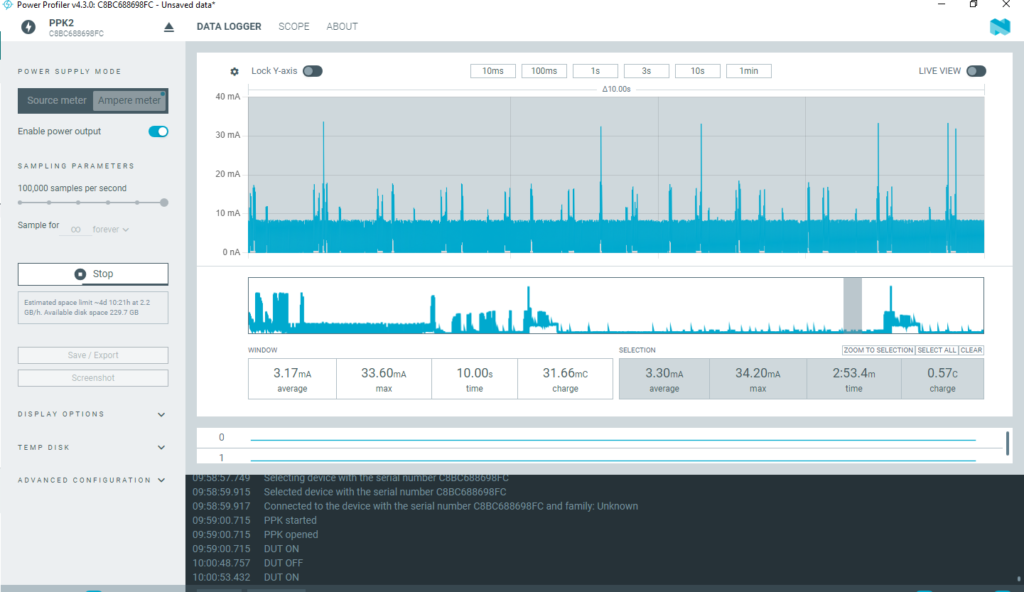
Below figure shows the whole system’s power profile which indicates the average current flow of 10.31mA. It has charge of 2.02c.
| Stage | Mode | Average Current | Duration | Charge | Energy | Max Current |
|---|---|---|---|---|---|---|
| Initial cycle | Sleep | 35.49mA | 57 sec | 2.04C | 7.49J | 424mA |
| Data send | Sleep | 67.58mA | 22 sec | 1.44C | 5.49J | 484mA |
| Sleep (3 min) | Sleep | 3.30mA | 3 min | 0.57C | 2.20J | 34.20mA |
| Send +sleep | Sleep | Sleep | 10.31mA | 3.16 min | 2.02C | 7.24J |
Battery Life Estimation #
EC0-M12-BC-C6-C-A consists of two 19,000 mAh . So it has total 38,000 mAh battery power. As for the above colleted data we have obtained battery life estimation when data send in every 3 minutes.
| Interval | Average Current per cycle | Estimated life (Hours) | Days | Months | Years |
|---|---|---|---|---|---|
| Every 3minutes | 10.31mA | 3685.74h | 153.573 days | 5.12 months | 0.42 years |
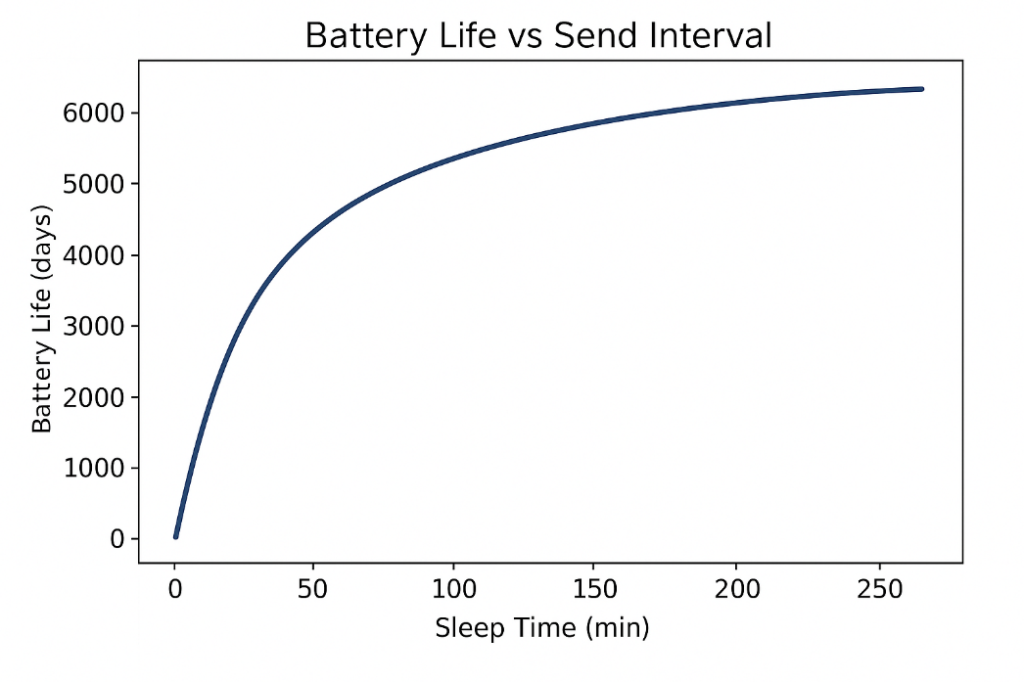
Below shows the formula to calculate average current and battery life for different intervals which help you to estimate the battery life for your application.
Key Points and Discussion #
Purpose and Usefulness #
- Sleep mode allows the EC-M12-BC-C6-C to reduce power consumption while maintaining RAM content, peripheral states, and modem initialization.
- Enables the system to resume normal operation immediately without full reinitialization.
- Ideal for short-duration tasks such as periodic sensor readings, data transmission, or event-driven responses.
Current Consumption and Duration #
- Typical current draw: 5mA, depending on active peripherals and clocks.
- Maximum recommended sleep duration in this mode: 30seconds – 3 minutes
- Sleep mode consumes more power than deep sleep or shutdown, but allows instant task continuation without initialization delays..
Practical Scenarios #
- High-frequency sensor sampling where rapid wake-up is required.
- Systems needing immediate response to external interrupts or events.
- Applications where reinitializing the modem or peripherals is time-consuming
- Short pauses to save power between rapid consecutive tasks.
Advantages #
- Fast wake-up: operation resumes immediately.
- No need to reinitialize modem or peripherals: RAM and states remain intact.
- Supports high-frequency duty cycles without disrupting ongoing processes.
- Simplifies software design: no state restoration required after wake-up.
Disadvantages Compared to Deep Sleep / Shutdown #
- Higher current consumption reduces battery life for long-duration idle periods.
- Not suitable for multi-minute or multi-hour sleep.
- Limited energy savings due to active peripherals, clocks, and modem.
- Poor cellular signal can increase standby current, as the modem draws more power to maintain connectivity.
Summary #
- Sleep mode is optimal for short-term, high-responsiveness tasks where retaining operational state is more important than minimizing power consumption.
- For ultra-low-power or long-duration sleep, use deep sleep or shutdown modes instead.


